
Choose a Comparison Baseline
Compare From tells Alert Relay where a comparison or version-history range should begin.
For the two change actions, it selects one earlier version to compare with the current item, file, or page. For Get Item or File Version History, it is the inclusive older boundary of a range.
Recommended value for a triggered flow
For most flows that begin with a SharePoint change trigger, set Compare From to the trigger's Trigger Window Start Token.
This aligns Alert Relay with the SharePoint trigger window and answers “What changed since this trigger window began?” It does not always mean “compare with the immediately previous version.” A trigger window can cover several SharePoint edits made before the Alert Relay action runs.
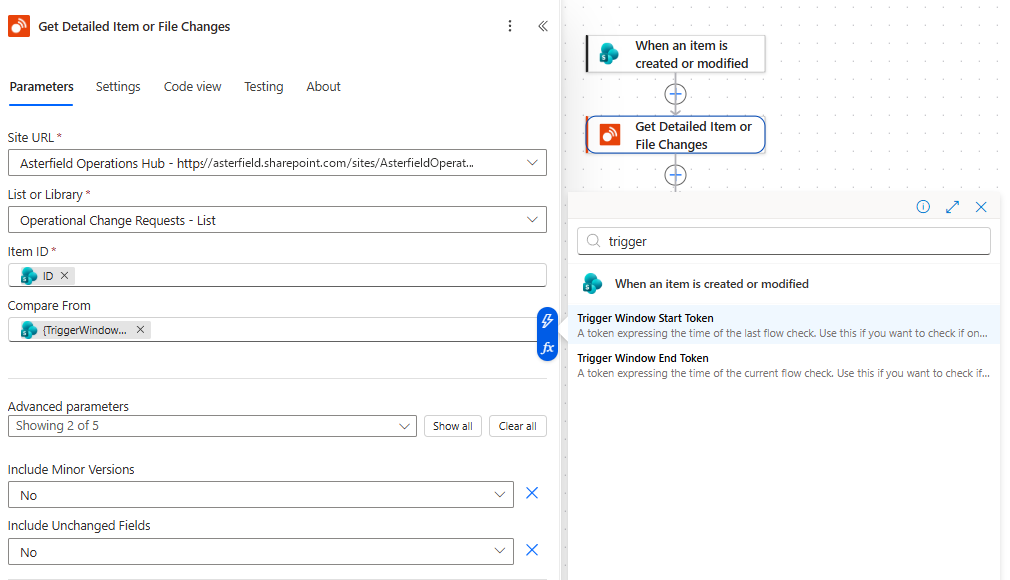
The SharePoint trigger's Trigger Window Start Token selected as the comparison baseline for the detailed changes action.
Which actions accept which values?
| Action | Meaning of Compare From | Accepted values |
|---|---|---|
| Get Detailed Item or File Changes | The earlier comparison baseline. | Trigger-window token, raw SharePoint change token, version label, ISO 8601 date, or ISO 8601 date and time. Blank uses the oldest eligible version. |
| Get Item or File Changes as Alert HTML | The earlier comparison baseline. | Trigger-window token, raw SharePoint change token, version label, ISO 8601 date, or ISO 8601 date and time. Blank uses the oldest eligible version. |
| Get Item or File Version History | The inclusive older boundary of the returned range. | Trigger-window token, raw SharePoint change token, version label, ISO 8601 date, or ISO 8601 date and time. Blank means no older boundary. |
| Parse SharePoint Version Information | A token to decode, not a comparison baseline. | Trigger-window token or raw SharePoint change token only. Supply a version label separately in Version Number. |
Supported comparison values
SharePoint trigger-window token
Use Trigger Window Start Token from a SharePoint trigger when the comparison should begin at the trigger window.
The token represents a SharePoint change window for the list or library. Alert Relay maps its timestamp to an eligible retained version of the requested item or file. Because the window is not an item-specific version number, the resolved baseline can be older than the last single edit.
Raw SharePoint change token
A raw SharePoint change token contains the same type of change-position information without the Base64 encoding normally applied by Power Automate.
Use a raw token only when another trusted SharePoint process supplies it. Do not ask ordinary users to create or edit one.
Version label
Enter a SharePoint version label such as:
5.0for a major version5.2for a minor or draft version
When using a minor version label, set Include Minor Versions to Yes. Otherwise, the change actions reject that baseline because the selected version is excluded from the comparison.
ISO 8601 date
Enter a date such as 2026-09-03 to resolve the comparison from midnight on that date.
Alert Relay interprets a date-only value as:
- midnight in the selected Timezone, or
- midnight UTC when no timezone is selected
ISO 8601 date and time
Enter a date and time when the time of day matters. Prefer an explicit UTC or offset value, for example:
2026-09-03T04:30:00Z2026-09-03T14:00:00+09:30
An explicit offset makes the intended instant unambiguous.
Blank Compare From behavior
Blank does not have the same effect in every action.
Detailed Changes and Alert HTML
When Compare From is blank, Alert Relay compares the current item or file with the oldest eligible version available to the connection:
- with Include Minor Versions set to No, it uses the oldest eligible major version
- with Include Minor Versions set to Yes, it uses the oldest eligible version, including a minor version when applicable
This can show the net change across the item's retained history. Use Trigger Window Start Token instead when you want the comparison aligned with a SharePoint trigger.
Version History
When Compare From is blank in Get Item or File Version History, there is no older range boundary. Other controls—including Compare To, Maximum Versions, the pagination threshold, available history, and Maximum Usage Units—still limit the result.
How single-comparison baselines resolve
For Get Detailed Item or File Changes and Get Item or File Changes as Alert HTML:
- A trigger token or date resolves to the newest eligible retained version at or before that point in time.
- If that point predates the retained history, Alert Relay uses the oldest eligible version.
- If that point resolves to the current version, there is no distinct earlier baseline. Check Has Comparison Baseline and Is New Item rather than assuming an earlier version exists.
- A version label selects that exact retained version when available.
- If an exact version label is no longer retained, the current compatibility behavior uses the oldest eligible version. Check Previous Version Label to confirm what was actually selected.
- A minor version label is rejected when Include Minor Versions is No.
The action returns Previous Version Label so you can confirm the version actually used. Has Comparison Baseline, Is Baseline First Version, and Is New Item provide additional context about the result.
Use an inclusive Version History range
Get Item or File Version History has two optional boundaries:
- Compare From is the inclusive older boundary.
- Compare To is the inclusive newer boundary.
For example, Compare From 2.0 and Compare To 5.0 can return:
5.0
4.0
3.0
2.0
The rows are returned newest first. Limits, minor-version visibility, and retained history can reduce the result.
If a requested boundary falls between available versions or partly outside retained history, Alert Relay moves it inward to the nearest eligible version inside the requested range. The response reports:
- From Version Resolution and To Version Resolution
- Resolved From Version Label and Resolved To Version Label
A resolution can be:
NotSpecified: no boundary was providedExact: the boundary matched an available version or time boundary exactlyClampedInward: the boundary moved to the nearest eligible version inside the rangeNoOverlap: the requested boundary leaves no available versions in the range
A range whose Compare From boundary is newer than Compare To is invalid.
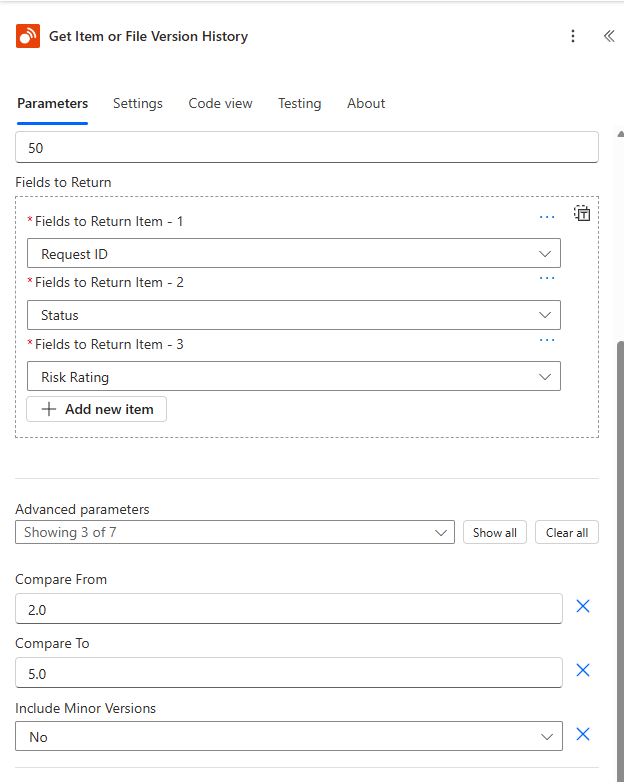
An inclusive Version History range that starts at version 2.0 and ends at version 5.0.
Example: changes since a SharePoint trigger
Use this pattern for a normal SharePoint alert flow:
- Start with a SharePoint item or file trigger.
- Set the detailed or HTML action's Compare From to Trigger Window Start Token.
- Run the flow after changing the SharePoint item.
- Check Previous Version Label in the Alert Relay output to see which version the token resolved to.
If the token resolves to version 9.0 and the current visible version is 16.0, Alert Relay compares 9.0 with 16.0. The result represents the net field changes across that interval.
Example: compare with a known version
Enter a retained version label such as 5.0 in Compare From when the current item should always be compared with that release or review point.
After the action runs, verify Previous Version Label. If SharePoint no longer retains 5.0, Alert Relay's compatibility behavior can resolve to the oldest eligible retained version instead.
Example: apply a go-live date
Suppose a flow goes live on 3 September 2026 and should not compare changes from before that date.
- Use Parse SharePoint Version Information to decode the SharePoint trigger token.
- Compare Token Date Time UTC or Token Date Time Local with the go-live date.
- If the token predates go-live, pass
2026-09-03to Compare From in the detailed or HTML action. - Otherwise, pass the original Trigger Window Start Token.
The Parse action itself accepts only a trigger-window or raw change token in its Compare From input. The subsequent detailed or HTML action accepts the date chosen by the flow.
Use comparison boundaries in Copilot Studio
Avoid expecting an end user to provide a raw trigger token or change token in conversation. For an agent tool, use a fixed boundary, a version or date obtained from clear user context, or a controlled topic or flow that supplies the value.
When a user's request is ambiguous, the agent should ask whether they mean:
- one before-and-after comparison
- changes since a particular date or version
- several entries from Version History
Always report the resolved version labels when they materially affect the answer.
Common issues
The comparison includes more edits than expected
A SharePoint trigger window can span several edits. Check Previous Version Label and the value passed to Compare From. Use an exact retained version label when you intentionally need one version boundary.
A minor version label is rejected
Set Include Minor Versions to Yes, or choose a major version label.
The selected baseline is older than expected
The requested version might no longer be retained, or the trigger/date might predate the available history. Check Previous Version Label and the item's retained SharePoint versions.
Version History returns no overlapping versions
Check that Compare From is not newer than the available history and Compare To is not older than it. Also confirm that Compare From is not newer than Compare To.
A date resolves to the wrong day
Check Timezone. A date-only value uses midnight in the selected timezone, while a value ending in Z represents UTC.