
Parse SharePoint Version Information
Use Parse SharePoint Version Information to decode a SharePoint trigger token before calling an Alert Relay action that retrieves change details or version history.
When you also provide SharePoint version metadata, the action can decide whether the visible version should be processed. This helps a flow avoid unwanted alerts and unnecessary usage-unit consumption when SharePoint fires for an excluded draft or when the visible version did not change during the trigger window.
This is a non-billable action. It does not consume an Alert Relay usage unit.
In an older connector version, this action appeared as Parse Compare From. Existing flows continue to use the same underlying operation, while the v1.1 designer displays Parse SharePoint Version Information.
When to use this action
Use this action when you want to:
- skip minor or draft versions before calling a billable Alert Relay action
- confirm that the visible SharePoint version changed during the trigger window
- inspect the date and time contained in Trigger Window Start Token
- apply a go-live or migration cutover date
- inspect a raw SharePoint change token for troubleshooting
You do not need this action in every Alert Relay flow. Use it when the flow needs a preflight decision or needs to inspect the token itself.
Recommended preflight flow
For a SharePoint list or library that can create minor versions:
- Start with the appropriate SharePoint item or file trigger.
- Add Parse SharePoint Version Information.
- Map the trigger values to Compare From, Version Number, and Modified Date.
- Set Include Minor Versions to the same value that you intend to use in the later Alert Relay action.
- Add a condition that checks whether Is New Version Detected is equal to
true. - In the true branch, call Get Detailed Item or File Changes, Get Item or File Changes as Alert HTML, or Get Item or File Version History.
- In the false branch, end the flow without calling a billable Alert Relay action.
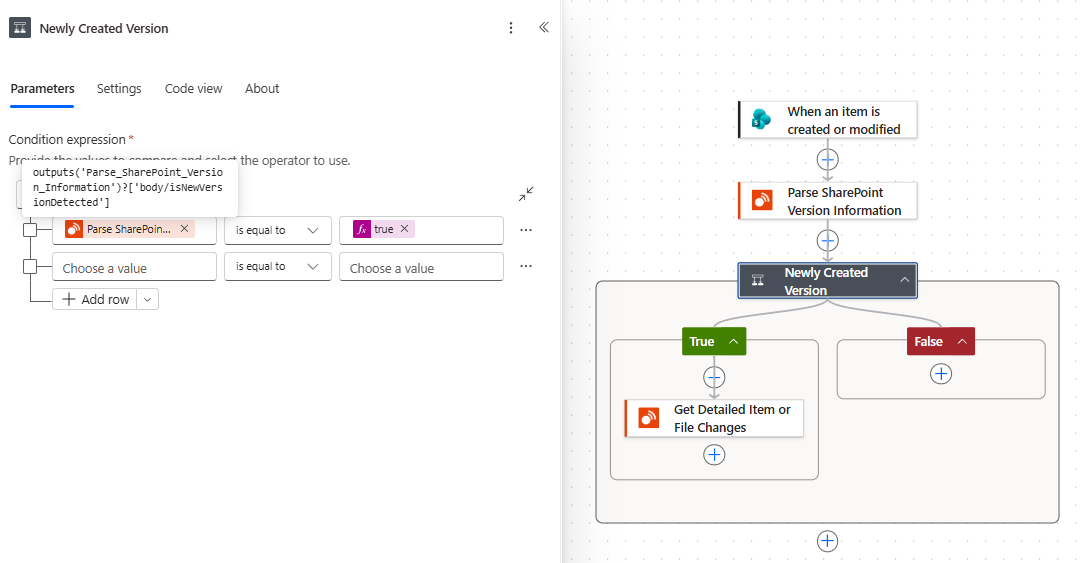
The flow retrieves detailed changes only when the Parse action reports that a new version was detected. The tooltip identifies the selected Is New Version Detected output.
Inputs
| Input | Required | What to provide |
|---|---|---|
| Compare From | Yes | Select the SharePoint trigger's Trigger Window Start Token, or provide a raw SharePoint change token. This input does not accept a version label, ISO date, or ISO date and time. Supply a SharePoint version label separately in Version Number when needed. |
| Version Number | No | Select the SharePoint version number, such as 0.1, 1.0, or 1.5, from the trigger or an earlier SharePoint action. Alert Relay uses it to identify minor and first-version states. |
| Modified Date | No | Select the visible SharePoint Modified value from the trigger or an earlier SharePoint action. Alert Relay compares it with the token timestamp to decide whether a new visible version was detected. |
| Include Minor Versions | No | Select Yes when minor or draft versions should be processed. The default is No. Use the same setting in the detailed Alert Relay action that follows. |
| Timezone | No | Select a timezone when you need local token and modified times. Without a timezone, the action returns UTC values only. |
For a reliable preflight decision, provide Version Number and Modified Date as well as Compare From.
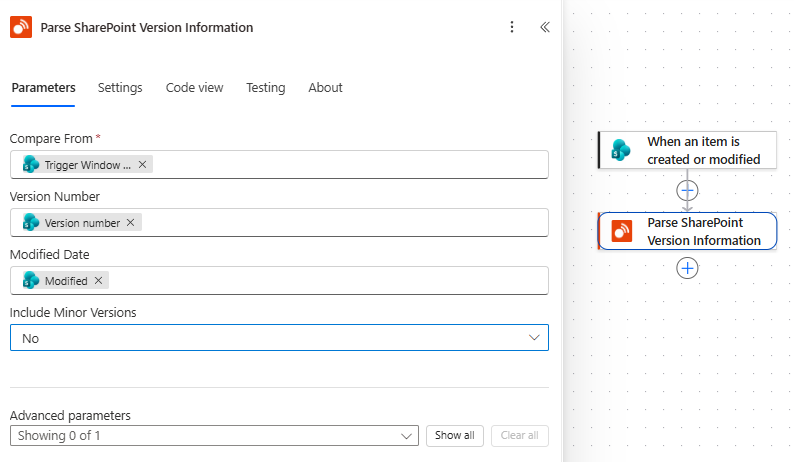
The Parse action configured with the trigger window token, version number, and modified date, with minor versions excluded.
Understand the decision
Is New Version Detected can return true, false, or a blank value:
| Result | Meaning | Recommended flow behavior |
|---|---|---|
true |
The supplied metadata indicates that this visible version should be processed. | Continue to the detailed Alert Relay action. |
false |
The version is an excluded minor version, or its Modified Date is earlier than the trigger-token timestamp. | Skip the detailed Alert Relay action. |
| Blank | The token was parsed, but there was not enough version metadata to decide. | Check the inputs rather than assuming that the version should be processed. |
The decision is made in this order:
- If Version Number identifies a minor version and Include Minor Versions is No, the result is
false. - Otherwise, if Modified Date is supplied, the result is
truewhen that date is on or after the token timestamp andfalsewhen it is earlier. - If Modified Date is not supplied and the version was not already excluded, the result is blank.
The action's Message explains the decision and is useful when checking a flow run.
Outputs
| Output | What it contains |
|---|---|
Success (success) |
true when the token and supplied version information were parsed successfully. |
Message (message) |
A user-facing explanation of the result or preflight decision. |
Token Date Time UTC (tokenDateTimeUTC) |
The date and time contained in Compare From, expressed in UTC. |
Token Date Time Local (tokenDateTimeLocal) |
The token date and time converted to the selected timezone. It is blank when no timezone is supplied. |
Decoded Token (decodedToken) |
The raw SharePoint change token after decoding. If the input was already a raw token, this matches the supplied value. |
Is Base64 Token (isBase64Token) |
true when the supplied token was Base64 encoded. |
Sequence (sequence) |
The SharePoint change sequence value contained in the token. |
List GUID (listGuid) |
The list or library GUID contained in the token. |
Token Version (tokenVersion) |
The SharePoint token version number. |
Token Type (tokenType) |
The SharePoint token type number. |
Is New Version Detected (isNewVersionDetected) |
The three-state preflight decision described above. |
Is Minor Version (isMinorVersion) |
true when Version Number identifies a minor or draft version. It is blank when no usable version number is supplied. |
Is First Minor Version (isFirstMinorVersion) |
true for the first minor version, normally 0.1. It is blank when no usable version number is supplied. |
Is First Major Version (isFirstMajorVersion) |
true for the first major version, normally 1.0. It is blank when no usable version number is supplied. |
Modified Date UTC (modifiedDateUtc) |
The supplied Modified Date normalized to UTC. It is blank when no modified date is supplied. |
Modified Date Local (modifiedDateLocal) |
The supplied Modified Date converted to the selected timezone. It is blank when the date or timezone is not supplied. |
Error (error) |
Error details when parsing does not succeed. |
Example: skip unwanted draft alerts
Suppose a document library uses major and minor versions, but the flow should send alerts only for published major versions.
- Set Compare From to the trigger's Trigger Window Start Token.
- Set Version Number and Modified Date from the SharePoint trigger or an earlier SharePoint action.
- Leave Include Minor Versions set to No.
- Continue to Get Item or File Changes as Alert HTML only when Is New Version Detected is
true.
If the version number is 1.5, the Parse action identifies it as a minor version and returns false. The HTML action is not called, so no alert is sent and it does not consume a usage unit for that excluded version.
Example: apply a go-live date
Suppose a flow goes live on 20 September 2026 and should not compare changes from before that date.
- Parse the trigger's Trigger Window Start Token.
- Compare Token Date Time UTC or Token Date Time Local with the chosen go-live date.
- If the token timestamp is earlier, supply the go-live date as Compare From in the detailed Alert Relay action.
- Otherwise, supply the original Trigger Window Start Token.
The Parse action itself accepts only a trigger-window or raw change token. The detailed changes and HTML actions accept the resulting date when you choose it as their comparison baseline.
Use this action in Copilot Studio
This action is primarily a Power Automate preflight helper rather than a general conversational tool. Get Detailed Item or File Changes and Get Item or File Version History are normally more useful for answering user questions.
The current Copilot Studio connector-tool experience might not expose all optional Parse inputs. If an agent scenario needs the full version-preflight decision, put the Parse action in a controlled Power Automate flow or topic path where Version Number, Modified Date, and Include Minor Versions can be supplied explicitly.
If you do add Parse as an agent tool, describe it narrowly as a tool for decoding a supplied SharePoint trigger token. Do not expect users to know or type raw change tokens during an ordinary conversation.
Handle token information safely
The decoded token includes operational SharePoint information such as a list GUID and sequence value. Do not display or retain raw tokens in ordinary notifications, agent answers, screenshots, or support records unless they are genuinely required for troubleshooting.
Common issues
Compare From is rejected
Use Trigger Window Start Token from a SharePoint trigger or a valid raw SharePoint change token in Compare From. Do not put a version label, date, or date and time in that input. Supply a SharePoint version label separately in Version Number when needed.
Is New Version Detected is blank
Provide Modified Date from the SharePoint trigger or an earlier SharePoint action. Also provide Version Number when the flow needs to identify and exclude minor versions.
A minor version returns true
Confirm that Version Number contains the SharePoint version label and that Include Minor Versions is set to No in both the Parse action and the later detailed action.
I expected local times, but only UTC values were returned
Select a valid timezone. Without Timezone, the action returns the token and modified values in UTC only.
The flow still sends an alert for a skipped version
Confirm that the billable Alert Relay action and email action are both inside the condition's true branch. They should not run when Is New Version Detected is false or blank.