
Working with Minor Versions
A SharePoint item or file trigger can run when a minor or draft version changes, even when the flow's connection cannot see that draft. Without a preflight check, the flow can continue to a billable Alert Relay action and send an email for a change that its intended audience should not receive.
Use Parse SharePoint Version Information before the detailed Alert Relay action. Parse is non-billable. It determines whether the version visible to the flow should be processed, allowing the flow to stop before consuming a usage unit or sending a notification.
Why draft visibility matters
The same minor-version edit can look different to different SharePoint connection identities:
- A connection that can see drafts can receive the minor version label, such as
1.5, and its current Modified value. - A connection that cannot see drafts can still receive a trigger run, but the visible version can remain at the last published major version, such as
1.0. Its visible Modified value can also remain older than the trigger window.
This means checking only whether the version label contains a minor number is not sufficient. The flow should provide Parse with both Version Number and Modified Date.
Parse can then return Is New Version Detected as false when:
- Include Minor Versions is No and the supplied version label is a minor version; or
- the visible Modified Date is earlier than the start of the current trigger window, indicating that the version visible to the connection did not change during that window.
Build the preflight flow
For a flow that should send notifications only for published major versions:
- Start with the appropriate SharePoint item or file trigger.
- Add Parse SharePoint Version Information immediately after the trigger.
- Set Compare From to the trigger's Trigger Window Start Token.
- Set Version Number to the SharePoint version number from the trigger or an earlier SharePoint action.
- Set Modified Date to the SharePoint Modified value from the same source.
- Set Include Minor Versions to No.
- Add a condition that checks whether Is New Version Detected is equal to
true. - In the true branch, add Get Detailed Item or File Changes or Get Item or File Changes as Alert HTML.
- Put the email action and any other notification steps in the same true branch.
- Leave the false branch empty, or terminate it without calling a billable Alert Relay action.
- Save or publish the flow, as shown by the designer, and test both a draft edit and a major-version publication.
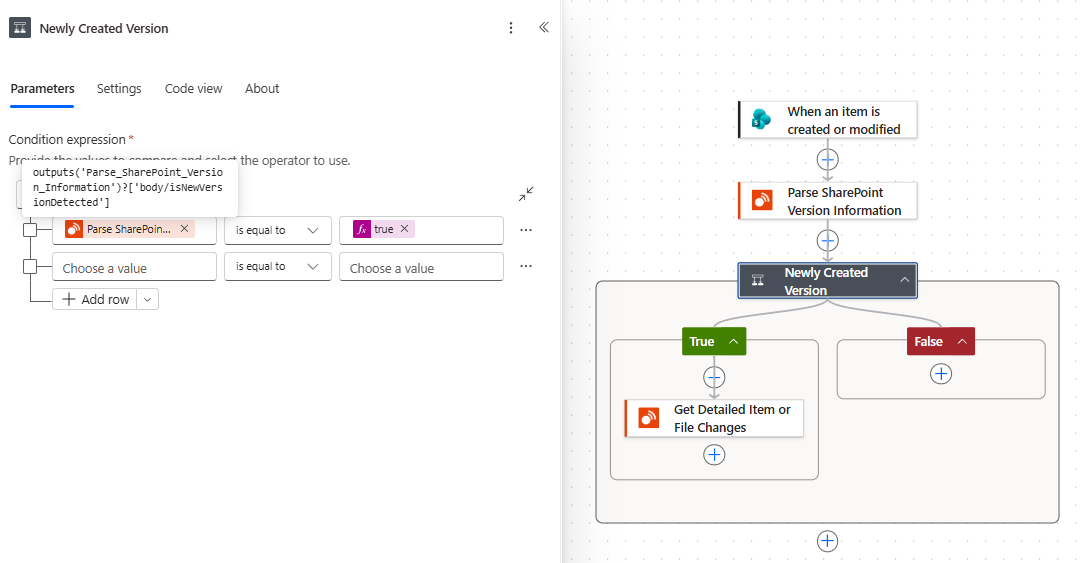
The detailed changes action runs only when Parse reports that a new visible version was detected.
Keep the settings consistent
Set Include Minor Versions to the same value in Parse and the detailed action that follows:
- Use No when draft changes should not consume usage or generate notifications.
- Use Yes when minor versions are intentionally part of the process and the Alert Relay connection is allowed to read them.
Do not put the detailed Alert Relay action or email action after the condition. They must be inside the true branch; otherwise, they can still run when Parse returns false or a blank value.
Understand the result
| Is New Version Detected | Meaning | What the flow should do |
|---|---|---|
true |
The supplied metadata shows a visible version that should be processed. | Run the detailed Alert Relay action and continue the notification process. |
false |
The supplied minor version is excluded, or the version visible to the connection did not change during the trigger window. | End the run without calling a billable action or sending the notification. |
| Blank | Parse decoded the token but did not receive enough version metadata to decide. | Check that Version Number and Modified Date are mapped correctly. Do not treat a blank result as approval to continue. |
Because Parse SharePoint Version Information is non-billable, a run that follows the false branch does not consume an Alert Relay usage unit. The usage unit is avoided because the flow never calls the detailed changes or HTML action.
Test both visibility scenarios
If possible, test with identities that have different draft visibility:
- Edit a document or item to create a minor version.
- Confirm that a connection allowed to see drafts receives the minor label.
- Confirm that Parse returns
falsewhen Include Minor Versions is No. - Test with a connection that cannot see drafts.
- Confirm that the SharePoint trigger can still run, but Parse returns
falsebecause the visible version's Modified Date predates the trigger window. - Publish a new major version.
- Confirm that Parse returns
true, the detailed action runs, and the expected notification is sent.
If only one test identity is available, at minimum test one excluded minor edit and one published major version. Check the flow run history to confirm that the billable action is skipped for the minor edit.
Common mistakes
Only Version Number is supplied
A connection that cannot see drafts might continue to expose the last published major version number. Supply Modified Date as well so Parse can determine whether that visible version changed during the trigger window.
The detailed action still runs for a minor edit
Confirm that:
- the condition uses Is New Version Detected from Parse;
- the comparison is is equal to
true; - Include Minor Versions is No in both actions; and
- the detailed action is inside the condition's true branch.
An email is still sent
Move the email action into the same true branch as the detailed Alert Relay action. Do not send the email after the condition.
Minor versions should be included
Set Include Minor Versions to Yes in both actions and confirm that the Alert Relay connection can read draft versions. SharePoint draft security can prevent some identities from retrieving them.